Your incognito tabs
deserve better.

Recover closed tabs. Save secret bookmarks. Create decoy spaces with plausible deniability — all without leaving your device.

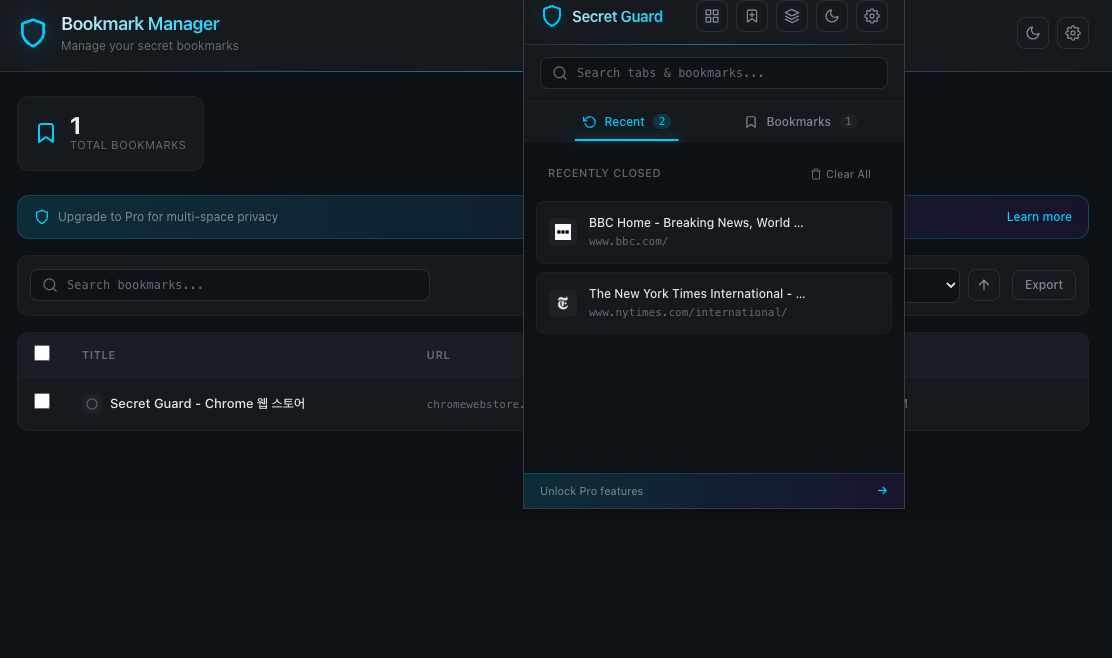
Secret Guard - Bookmark Manager and Popup
🔄
One-click tab recovery
🔖
Secret bookmarks
🔒
PIN lock

No account. No data collection. Works entirely on your device.

One extension. Multiple secret spaces.

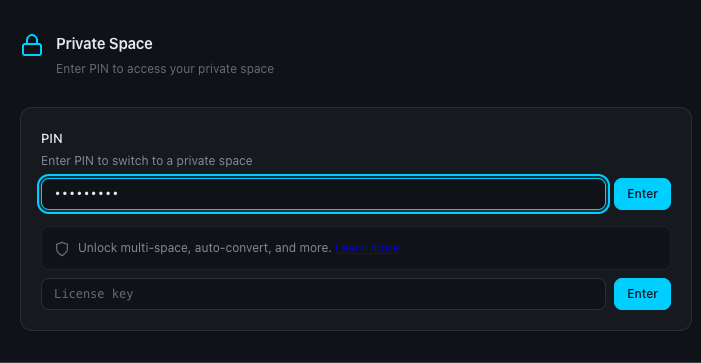
Each PIN opens a different space. Enter the wrong PIN? No error — just a decoy. Plausible deniability, built in.

  • No wrong PIN errors — ever
  • Each space is completely isolated
  • Others see only what you want them to see
Free: 1 space · Pro: up to 8 spaces
PIN entry to access private space

Everything you need for private browsing

All core features are free. No account required, no data collection.

🔄

Session Recovery

Restore accidentally closed incognito tabs with one click during your session.

🔖

Secret Bookmarks

Save bookmarks in a separate, private storage completely isolated from Chrome bookmarks.

🔍

Search & Sort

Find any tab or bookmark instantly with integrated search, sorting, and filtering.

💡

Smart Detection

Automatically detects bookmarks created in incognito and offers to move them to secret storage.

Auto-Expire

Set bookmarks to automatically delete after a specified number of days.

🔒

PIN Lock

AES-256-GCM encryption with PBKDF2 key derivation and auto-lock timeout.

🔒 100% Local — data never leaves your device
🛡 AES-256-GCM · PBKDF2 key derivation
🚫 Zero data collection · No account required
Manifest V3 · Chrome Web Store verified

Get started in seconds

No sign-up, no configuration, no data leaves your device.

1

Install

Add Secret Guard from Chrome Web Store and enable it for incognito mode.

2

Browse

Use incognito as usual. Secret Guard works silently in the background.

3

Recover & Manage

Restore closed tabs, save bookmarks, and switch between decoy spaces — all with one click.

Free forever. Pro when you need it.

All core features are free with no limits. Pro adds multi-space privacy and convenience features.

Free

$0
forever
  • Session recovery
  • Unlimited secret bookmarks
  • Search & sort
  • 1 decoy space
  • Auto-lock timeout
  • Auto-expire
  • Bookmark manager & export
  • Save all tabs at once
  • Dark/light theme & multi-language
Add to Chrome

Pro

$3.99/mo
or $29.99/year (save 37%)
  • Everything in Free
  • Up to 8 decoy spaces
  • Auto bookmark conversion
  • URL redirect tracking (coming soon)
  • Encrypted cloud backup (coming soon)
Get Pro

Frequently asked questions

Is my data safe?
All data is stored locally on your device. Nothing is ever sent to external servers. The only network call is for Pro license verification.
Can I recover tabs after closing all incognito windows?
By default, tab history is cleared when all incognito windows close — this is by design for privacy. Enable “Persist Bookmarks” in settings to keep saved bookmarks across sessions.
What happens if I forget my PIN?
Only the data in that PIN space becomes inaccessible. Your default space and other PIN spaces are unaffected. Export your bookmarks regularly as a backup.
Can I use Pro on multiple devices?
A Pro license activates on one desktop device at a time. Re-enter your license key on a new device to transfer it automatically. The previous device will deactivate on its next verification check.
What payment methods do you accept?
We accept credit cards, PayPal, and Apple Pay through our payment partner Lemon Squeezy.

Your incognito tabs are waiting.

Free forever. Install in 10 seconds.

Add to Chrome — Free